Sankey diagram: what it is and when to use one
A Sankey diagram shows how a quantity flows from one set of things to another. Each flow is drawn as a band, and the band's width is proportional to the amount it carries. Follow the bands and you see where everything came from, where it went, and which flows are biggest.
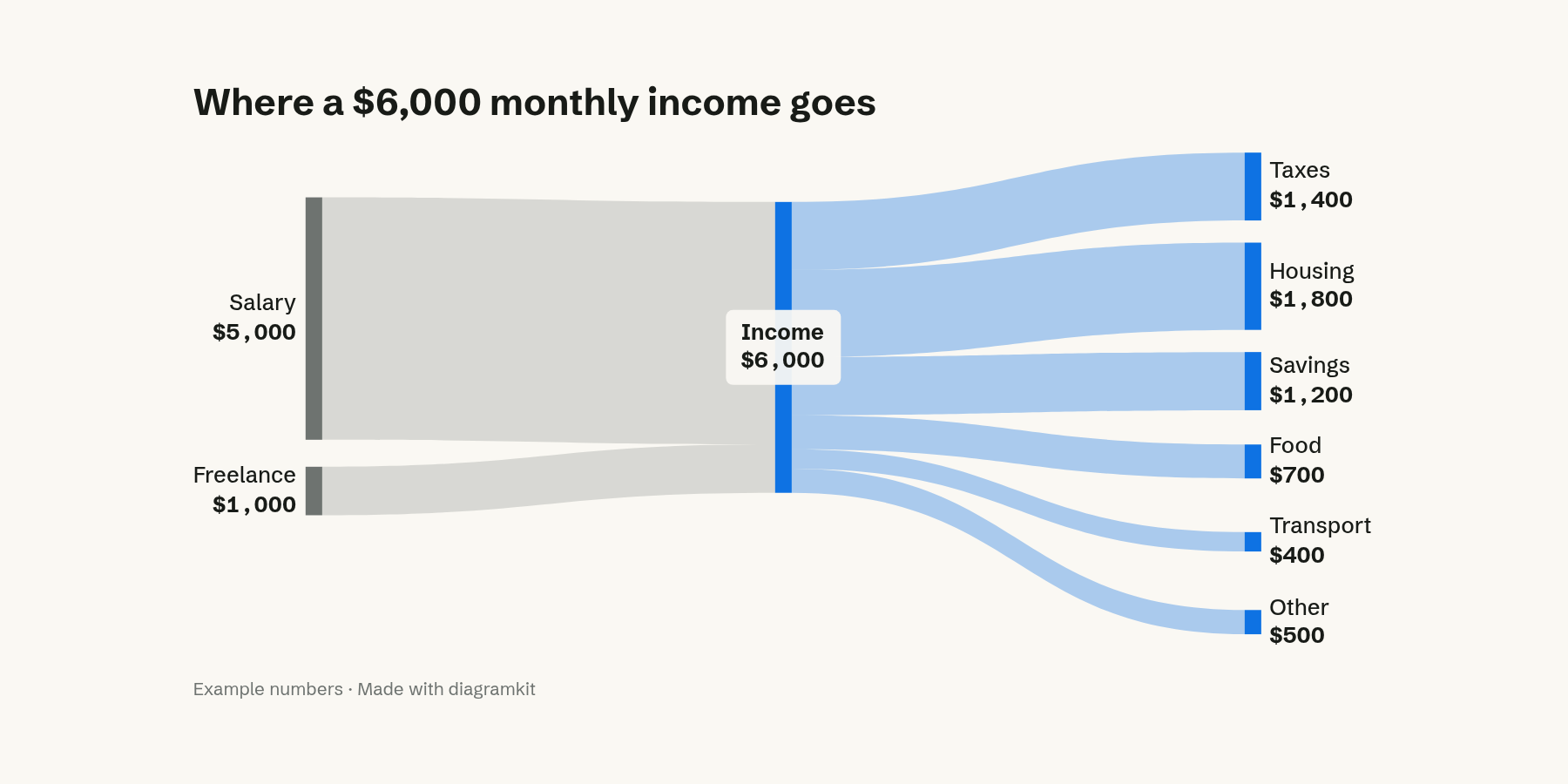
In this example, two income sources join into one $6,000 total, which splits into six kinds of spending. You can see at a glance that housing takes the biggest share and that savings is close behind, without reading a single number.
The parts of a Sankey diagram
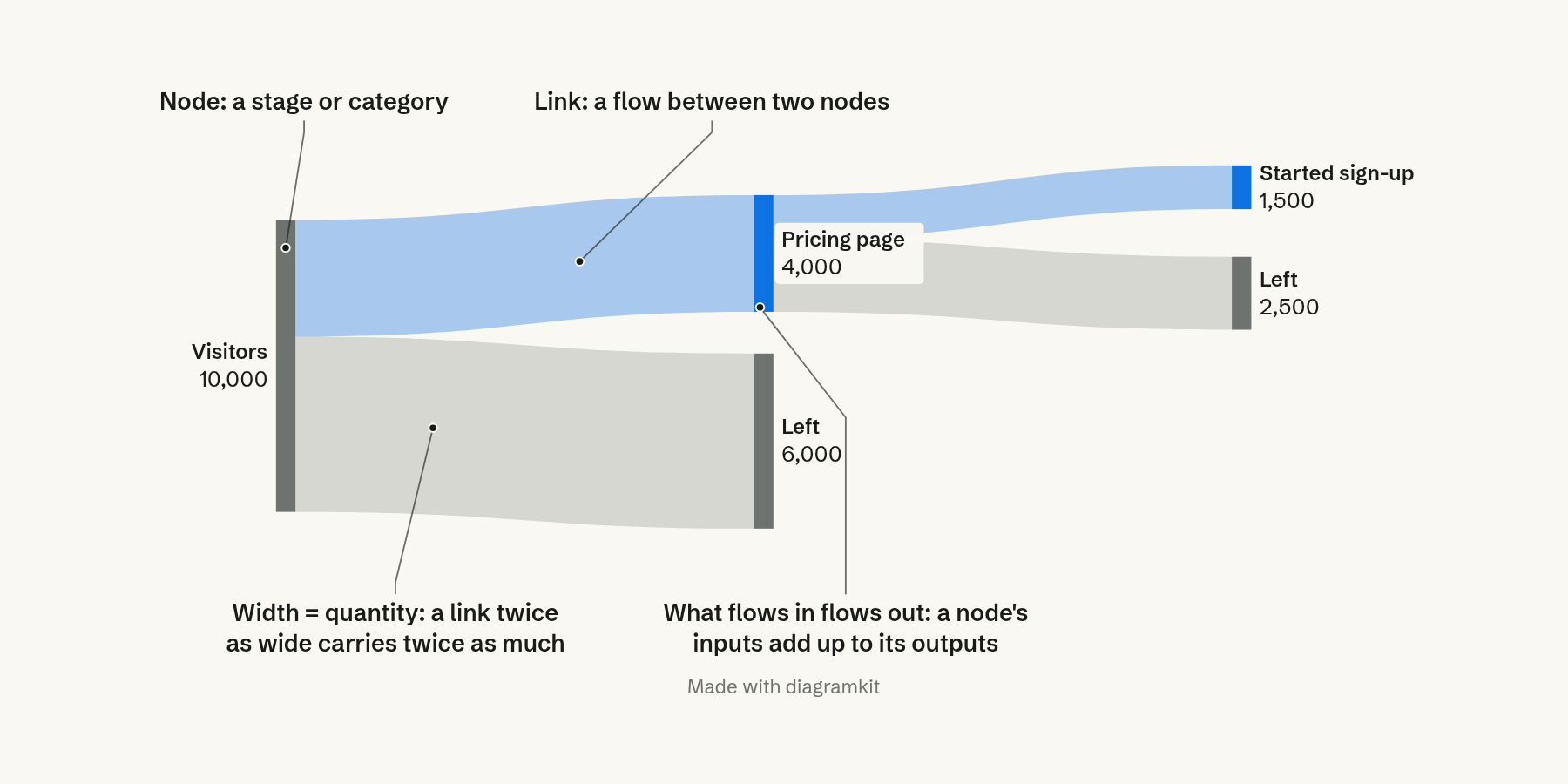
- Nodes are the stages or categories, drawn as bars: Salary, Income, Housing.
- Links are the bands between nodes, one per flow.
- Width is the quantity. A band twice as wide carries twice as much. This is the one rule that makes a Sankey readable.
- What flows in flows out. A node's incoming bands add up to its outgoing bands. When they don't, something is missing from the data, or the diagram is showing a loss on purpose.
Where the name comes from
The diagram is named after Matthew Henry Phineas Riall Sankey, an engineer who used one in 1898 to show how much of a steam engine's energy became useful work and how much was lost as heat (Wikipedia). Energy is still the classic use: a country's energy accounts, from fuels to homes, transport and industry, with the wasted energy drawn as its own band. Charles Minard's 1869 map of Napoleon's march on Moscow, where the army's width shrinks as soldiers die, used the same idea 29 years earlier.
When to use a Sankey diagram
Use a Sankey when the question is "where does it all go?" and the answer has more than one step. Good fits:
- Money: income to spending, revenue to costs and profit, a budget across departments.
- Energy and materials: fuel to electricity to uses, raw material to product and waste.
- People moving through steps: visitors to pages to sign-ups, applicants to interviews to offers, and where each group leaves.
Use something else when the data doesn't flow:
- Parts of one whole, one step: a stacked bar or a pie is simpler.
- A change over time: a line chart.
- Only how many are left at each step: a funnel chart.
Sankey diagram vs funnel chart
A funnel and a Sankey can show the same sign-up data. The funnel shows how many people remain after each step. The Sankey also shows where the others went.
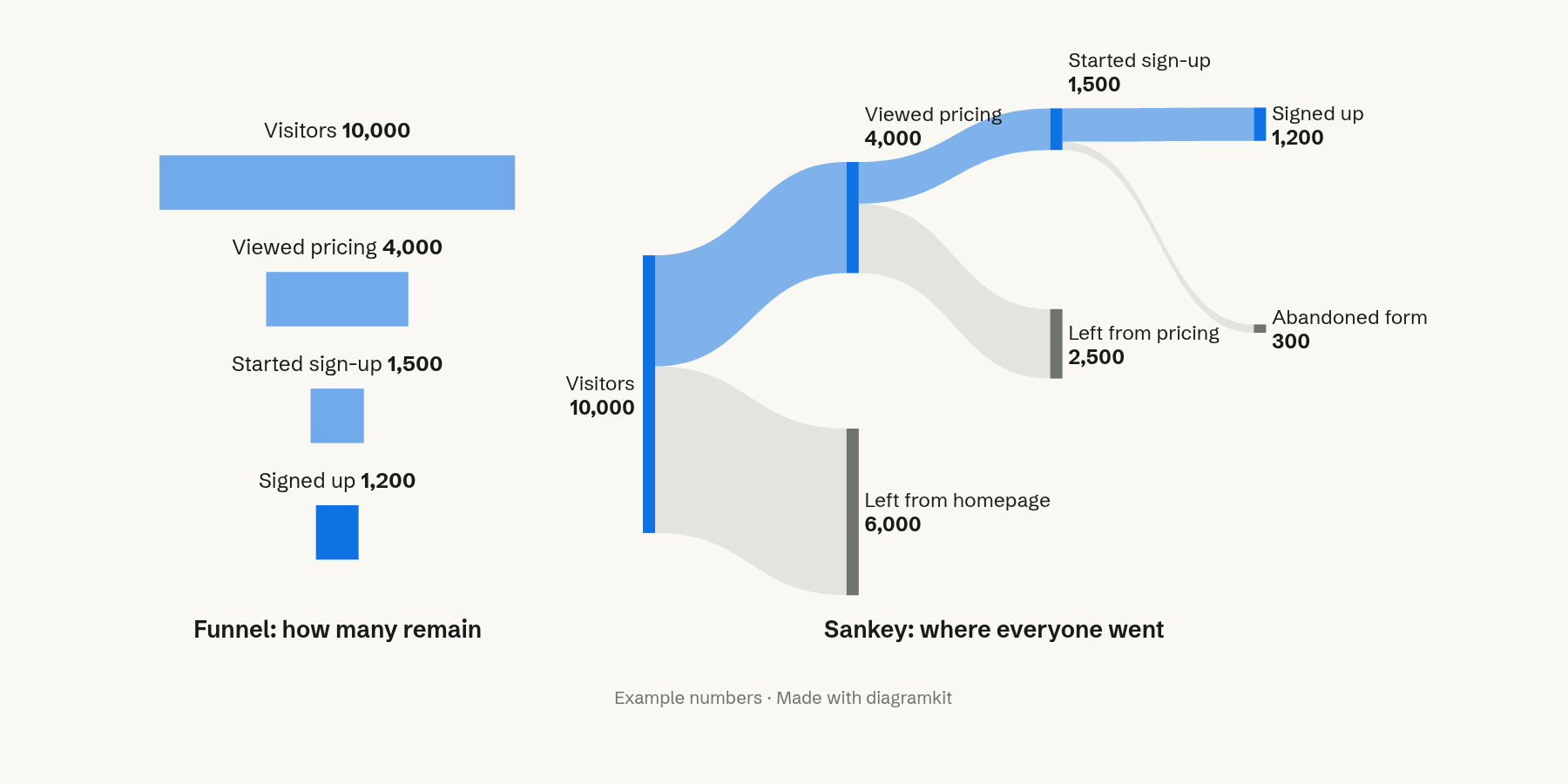
Of 10,000 visitors, 1,200 signed up. The funnel shows the drop at each step. The Sankey shows that 6,000 left from the homepage, 2,500 from the pricing page and 300 abandoned the form. If you are deciding which page to fix first, that is the view you need.
How to make a Sankey diagram that reads
- Start from a table of flows. Each row is a source, a target and an amount: Income, Housing, 1,800. That is all a Sankey needs, and it is how most tools take the data.
- Check the balance. Add up what enters and leaves each node. Mismatches are usually data mistakes.
- Order the nodes. Put the biggest flows next to each other and in the same order at every stage, so bands cross as little as possible.
- Color by meaning. Color bands by their source or by one category you want followed. Color everything differently and nothing stands out.
- Label the amounts. Width shows proportion, but readers still want the number. Put it on the node or the band.
- Keep it to a few stages. Past four or five columns and a dozen nodes, the bands tangle. Group small flows into "Other".
FAQ
What is the difference between a Sankey diagram and an alluvial diagram?
An alluvial diagram is a kind of Sankey that shows how the same items regroup across several categories or points in time, such as voters moving between parties across elections. Every column holds the same total. A Sankey can have flows that join, split and leave the diagram.
Can I make a Sankey diagram in Excel?
Not as a built-in chart type in the desktop app. Most people use a dedicated tool, a charting library such as D3 or Plotly, or an AI diagram tool that takes the flows as text.
What data do I need for a Sankey diagram?
A list of flows, each with a source, a target and an amount. The nodes come from the sources and targets, and the bands from the amounts.
Filed under Making better diagrams