Swimlane diagram: what it is and how to make one
A swimlane diagram is a flowchart divided into lanes, one for each person, team or system involved in a process. Each step sits in the lane of whoever does it. A plain flowchart shows what happens. A swimlane diagram shows what happens and who does it, and every time work passes from one lane to another, you can see the handoff.
A worked example: an online store's refund
Here is how a refund works at a small online store, with four lanes: the customer, a support agent, finance and the payment system.
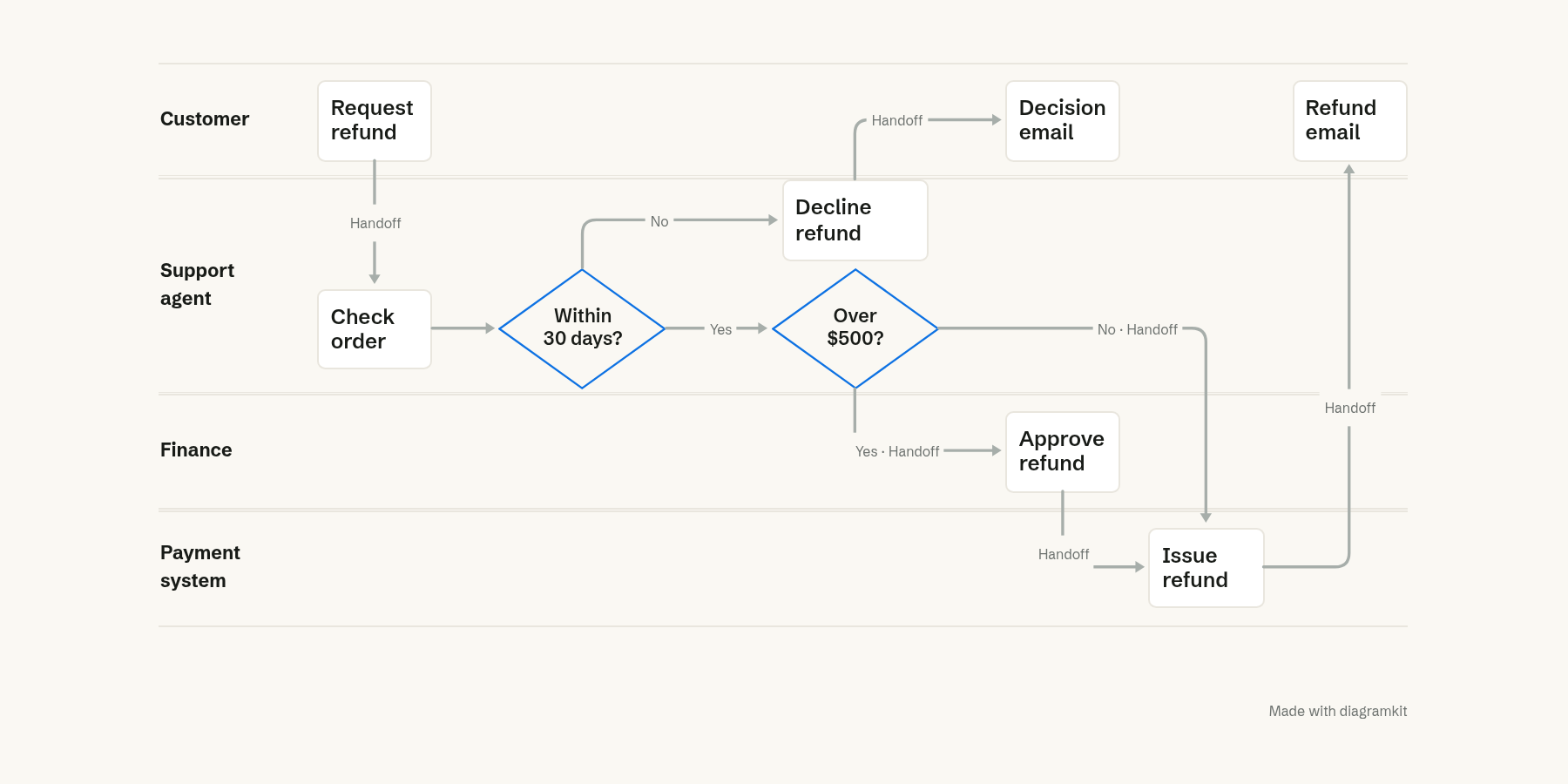
The customer asks for a refund. A support agent checks the order. If it is more than 30 days old, the agent declines and the customer gets an email. If not, refunds over $500 go to finance for approval, and smaller ones go straight to the payment system. The payment system issues the refund and the customer gets an email.
Drawn as one column of boxes, this would be a correct flowchart. The lanes add the part that matters when something goes wrong: the refunds over $500 cross two extra lanes, so they have two extra places to wait.
The parts of a swimlane diagram
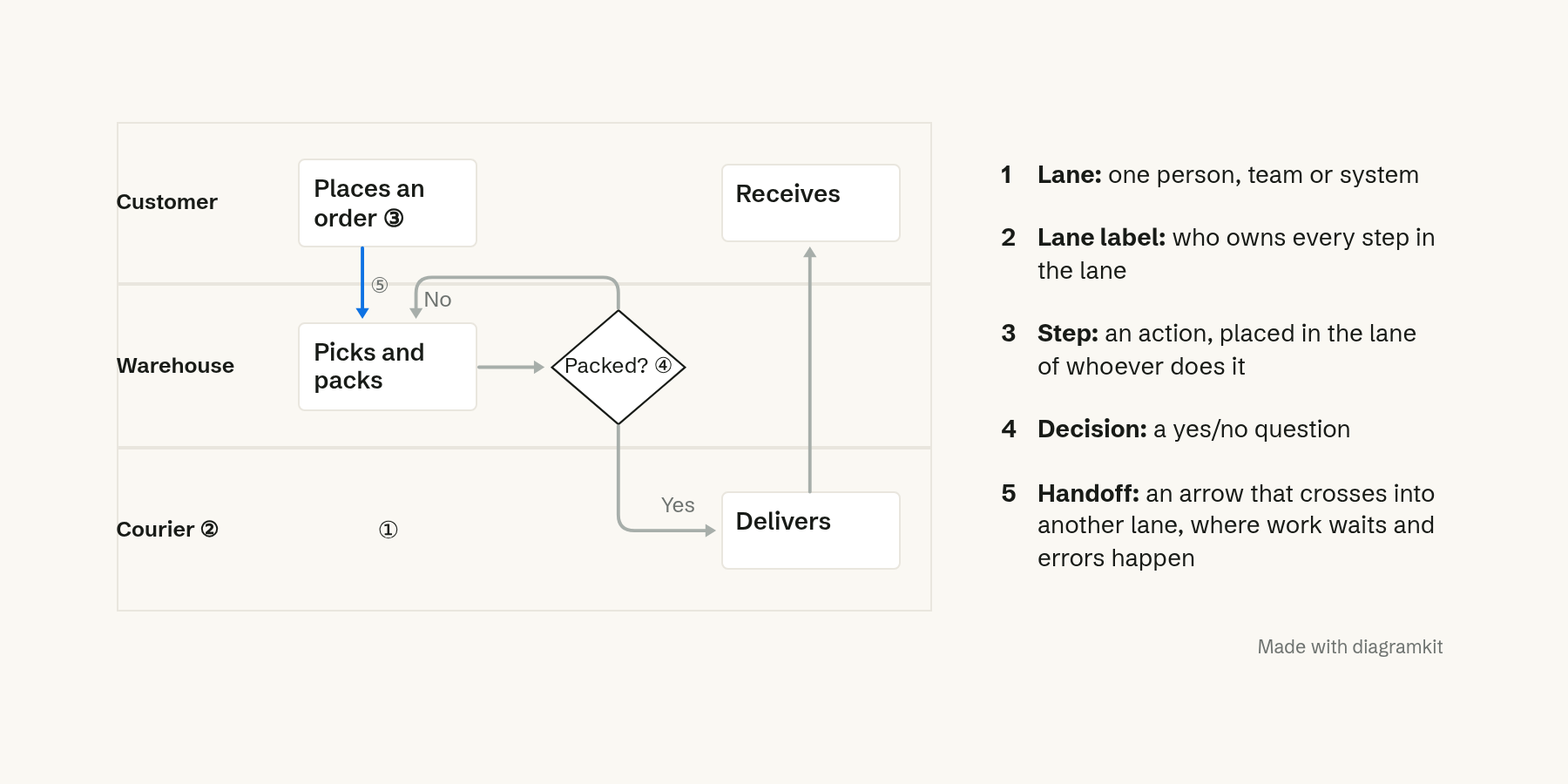
- Lanes are the rows (or columns), one per person, team or system.
- Lane labels name who owns every step in that lane.
- Steps are the actions, each placed in the lane of whoever does it.
- Decisions are yes-or-no questions, drawn as diamonds, that branch the flow.
- Handoffs are the arrows that cross into another lane. They are where work waits, where messages get lost, and usually where a process slows down.
Geary Rummler and Alan Brache made the format popular in their 1990 book Improving Performance, where they argued that the biggest problems in an organization sit in the white space between the boxes on its org chart (library record). Swimlanes are a way to draw that white space. You will also see them called cross-functional flowcharts or Rummler-Brache diagrams.
When to use a swimlane diagram
Use one when a process passes between people or systems and the handoffs matter:
- Mapping a process to improve it: counting handoffs and finding where work waits.
- Onboarding: showing a new person which steps are theirs.
- Agreeing on ownership: making it obvious which team owns each step, and spotting steps nobody owns.
- Systems: showing which service does what in a request, such as a browser, an API and a database.
A plain flowchart is enough when one person or one program does every step.
How to make a swimlane diagram
- Pick the start and end. "Customer asks for a refund" to "customer gets the money". A swimlane without clear edges grows forever.
- List the lanes. One per role, team or system. Use roles ("Support agent"), not names, so the diagram survives people changing jobs.
- Write the steps in order, each as a short verb phrase: "Checks the order", "Approves the refund".
- Put each step in its owner's lane. If you can't decide whose lane a step goes in, you have found an ownership problem.
- Add decisions where the flow branches, with each branch labeled.
- Connect the steps with arrows that flow one way, left to right or top to bottom.
- Look at the handoffs. Count the arrows that cross lanes. Each is a place to ask whether the handoff is needed.
Keep it to the lanes that matter. Past six or seven lanes, a swimlane diagram gets wide and the arrows tangle. Group minor roles together or split the process into two diagrams.
FAQ
What is the difference between a swimlane diagram and a flowchart?
A swimlane diagram is a flowchart with lanes. The steps and arrows are the same. The lanes add who does each step, which a plain flowchart leaves out.
Should swimlanes be horizontal or vertical?
Either works. Horizontal lanes suit wide pages and slides, and the process reads left to right. Vertical lanes suit documents and phones, where there is more room down than across.
What is a pool in BPMN?
In BPMN, the standard notation for business processes, a pool is one whole participant, such as a company, and lanes divide the pool into the roles inside it. Most swimlane diagrams outside BPMN only need lanes.
Filed under Making better diagrams